So you’ve adopted serverless and started using GCP Workflows for the orchestration. And everything is great, but suddenly you’re facing an issue with the timing out of one of your service calls.
main:
    steps:
    - getCurrentTime:
        call: http.get
        args:
            url: https://us-central1-workflowsample.cloudfunctions.net/datetime
        result: currentDateTime
    - returnOutput:
        return: ${currentDateTime.body.dayOfTheWeek}
You’re going and checking that your Cloud Function, App Engine, or Cloud Run timeout limit is set to the maximum already (probably 60 minutes) and starting to dig up. Eventually, you understand that the Workflows HTTP connector has only 30 minutes timeout for HTTP service calls, so what can you do now?
First of all, maybe you need to reconsider if you’re doing everything right, and serverless with its tighter limits is a good fit for your task. But if that’s the case, please welcome under the hood.
Some analysis
So synchronous HTTP calls in GCP Workflows have an up to 30 minutes execution timeout limit, so let’s maybe try async solutions.
There are callbacks available, but what if you need to call a serverless GCP service and get a notification back? If you just send a long-lived HTTP request to Cloud Functions or Cloud Run they are going to shut down your request processing as soon as the response is sent back (yes, you may enable “CPU always allocated” but now you’re going to pay for this CPU way longer than usually actually needed and we don’t want that).
So we need a solution to keep an HTTP request open and send back a callback to the Workflows to continue the execution.
Some prominent services from GCP that pop up in mind and are suited for async executions are Pub/Sub and Cloud Tasks. But you already know that Pub/Sub has only 10 minutes timeout for HTTP triggers, and using a pull subscription is not an option either because Cloud Functions and Cloud Run require an ongoing HTTP request.
So what about Cloud Tasks? Well, standard HTTP targets also have up to 30 minutes timeout, but… App Engine targets have up to 24 hours of a timeout to App Engine services with basic scaling! And that’s our loophole.
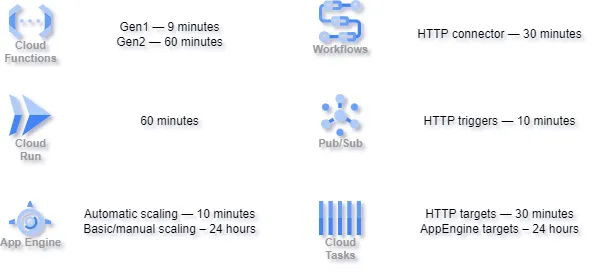
GCP services HTTP calls timeouts
The solution
So here’s what we’re gonna do to go beyond the usual 10 or 30 minutes timeout.
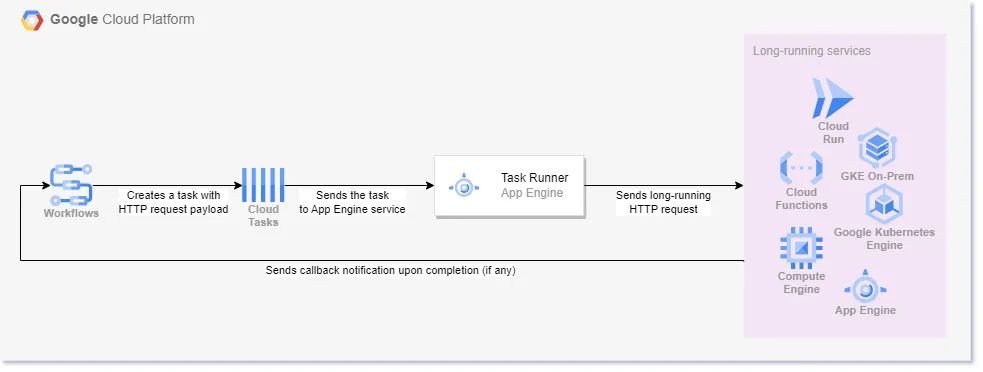
Long-running GCP Workflows HTTP requests setup
So whenever you want to have a long-running HTTP request with the Workflows you’d need to:
- Create a callback URL to notify the Workflows back.
- Create an async Cloud Task with the Task Runner App Engine service target and your service call details as the payload.
- Unwrap the Cloud Task payload and do a synchronous HTTP call from the Task Runner service to the destination service.
- Send back a callback with the service call results (if any).
- Continue the workflow execution.
The updated example
So how may the example GCP Workflow look now as we have the solution outlined?
main:
    steps:
    - createCallback:
        call: events.create_callback_endpoint
        args:
          http_callback_method: "POST"
        result: callbackDetails
    - createHttpCallPayload:
        assign:
          - httpCallPayload: {}
          - httpCallPayload.workflows_callback: ${callbackDetails}
    - createHttpCallTask:
        assign:
          - httpCallTask: {}
          - httpCallTask.method: "GET"
          - httpCallTask.body: ${httpCallPayload}
          - httpCallTask.content_type: "application/json"
          - httpCallTask.url: "https://us-central1-workflowsample.cloudfunctions.net/datetime"
          - httpCallTask.timeout: 2700
          - httpCallTaskJson: ${json.encode(httpCallTask)}
          - httpCallTaskEncodedJson: ${base64.encode(httpCallTaskJson)}
    - getProjectID:
        assign:
          - projectId: ${sys.get_env("GOOGLE_CLOUD_PROJECT_ID")}
    - scheduleGetCurrentTimeCall:
        call: googleapis.cloudtasks.v2.projects.locations.queues.tasks.create
        args:
          parent: ${"projects/" + projectId + "/locations/us-central1/queues/scheduled-tasks"}
          body:
            task:
              appEngineHttpRequest:
                httpMethod: "POST"
                relativeUri: "/"
                headers:
                  Content-Type: "application/json"
                body: ${httpCallTaskEncodedJson}
            responseView: "BASIC"
        result: scheduledTask
    - awaitCallback:
        call: events.await_callback
        args:
          callback: ${callbackDetails}
          timeout: 3000
        result: callbackResult
    - unwrapCallbackResult:
        assign:
          - currentDateTime: ${callbackResult.http_request}
    - returnOutput:
        return: ${currentDateTime.body.dayOfTheWeek}
That’s basically it. The only thing left is to implement the Task Runner service, set up all the infrastructure, and let your workflow calls run for much longer now.
And I will cover the Task Runner implementation along with an example of the infrastructure setup and the workflow in the next article.
I developed this approach while building a serverless data processing platform at Travelshift where we are building next-gen travel experience solutions. You can check it out at Guide to Europe and Guide to Iceland.